Expecting a remote support request? Only accept a remote connection during a support session you arranged with KPL Custom Computers. If you weren’t expecting a request, click Dismiss and call me at (732) 508-0232.
1. Arrange your session and open AnyDesk
Contact me first so we can confirm remote support is suitable for your problem and arrange a time. Make sure your computer is connected to the internet, save your work, and keep your phone nearby.
Use the download button above to get AnyDesk from its official website, then open the downloaded program. If a prompt or screen looks unfamiliar, tell me what you see and I’ll help.
2. Tell me your AnyDesk address
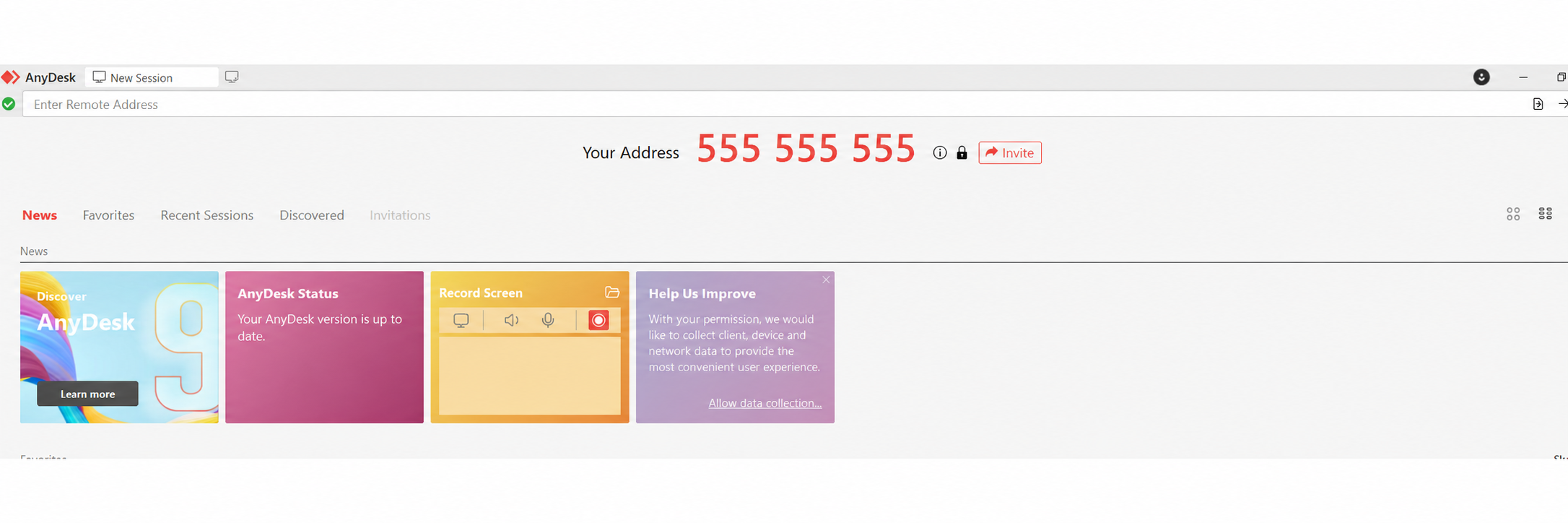
Look for Your Address near the top of the AnyDesk window. Read that number to me over the phone so I can send a connection request to your computer.
You don’t need to enter anything in the Enter Remote Address box for me to connect to you.
The number shown here is an example. Give me the address displayed on your own computer, and share it privately.
3. Accept my connection request
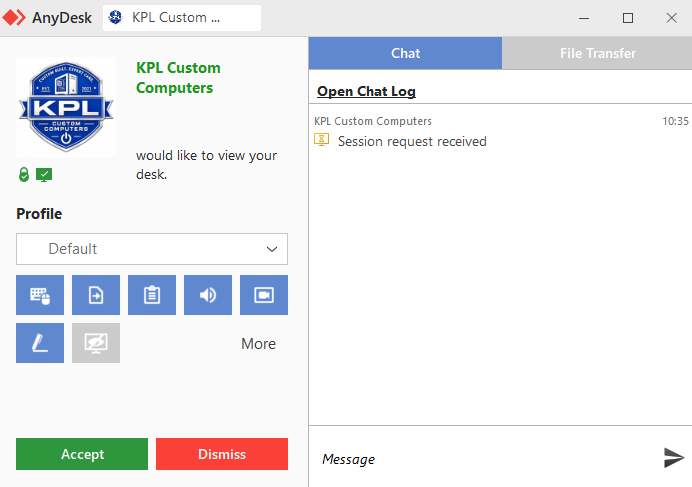
When my request appears, look for KPL Custom Computers and the KPL logo, as shown below. While we’re on the phone, confirm the request with me and click the green Accept button at the bottom left.
Click Accept to begin our arranged session. Click Dismiss if you weren’t expecting the request or something doesn’t look right.
You can leave the profile and permission buttons as they are unless I talk you through a change. Your AnyDesk version may look slightly different.
4. Stay with me during the session
Keep AnyDesk open and remain at your computer. You’ll be able to watch what I’m doing while we talk through the problem. Let me know before using the mouse or keyboard so we don’t get in each other’s way.
Enter passwords yourself when needed; you don’t need to read them aloud to me.
5. End the connection
You can end the session at any time using AnyDesk’s disconnect or end-session control. If you can’t find it, tell me and I’ll help you locate it. I’ll disconnect when our work is finished.
For a future appointment, contact me again to arrange another session.
Need a hand getting started? Call Keith at (732) 508-0232.